
Android Data Recovery İndir – Windows, Mac, Android ve iOS için Ücretsiz, Güvenli ve Hızlı Dosya Kurtarma Aracı
Android cihazınızda önemli fotoğrafları, kişileri, mesajları veya belgeleri kaybetmek stres yaratabilir. Android Data Recovery ile telefonunuzu rootlamadan dahili depolama ve SD kartlardan kaybolan verileri geri yükleyebilirsiniz. Bu güçlü yazılım, silinen medya dosyaları, WhatsApp mesajları, SMS, arama kayıtları, belgeler (Word, Excel, PDF) ve hatta e-posta kişileri kurtarmayı destekler. İster yanlışlıkla bir aile fotoğrafını silmiş olun, ister fabrika ayarlarına sıfırladıktan sonra iş dosyalarınızı kaybetmiş olun ya da arama geçmişinizi temizlemiş olun, bu güvenli veri kurtarma aracı verilerinizi hızlı ve güvenli bir şekilde geri getirir. Windows ve Mac ile uyumlu olan Android Data Recovery, kullanıcı dostu bir arayüz, hızlı tarama ve güvenilir sonuçlar sunar. Ücretsiz sürümü bugün indirin ve iç huzurunuzu yeniden kazanın.
Android Data Recovery Neden Mobil Veri Kurtarmada Öne Çıkıyor
In the crowded market of mobile recovery tools, Android Data Recovery distinguishes itself through its comprehensive feature set and user-focused design. Unlike many competitors that only recover photos and videos, this software goes beyond by targeting critical data like contacts, call logs, SMS, and even WhatsApp messages—data that is often irreplaceable. One of its standout features is the ability to recover full contact details, including names, job titles, phone numbers, and email addresses, preserving the integrity of your personal and professional network. This is especially valuable for users who rely on their phone’s address book for business or family communication. The software also excels in message recovery, restoring deleted SMS with full metadata—sender/receiver names, timestamps, and attachments. For those who use WhatsApp frequently, this is a game-changer. Even if you’ve deleted messages or uninstalled the app, Android Data Recovery can retrieve chat history, media, and documents—provided the data hasn’t been overwritten. This makes it a top choice for users concerned about privacy and data retention. Another major advantage is the no-root requirement. Many recovery tools demand root access, which can void warranties and pose security risks. Android Data Recovery works seamlessly on non-rooted devices, making it accessible and safe for average users. It supports both USB debugging and direct connection methods, offering flexibility based on user comfort. The interface is clean and intuitive, guiding beginners through each step with clear instructions and progress indicators. Whether you're recovering a single photo or an entire call log, the process remains simple and efficient. With support for multiple file formats—including DOCX, XLSX, PDF, PPTX, HTML, and ZIP—it eliminates the need for multiple recovery apps. This all-in-one solution ensures you don’t have to juggle different tools, saving time and reducing frustration.Android Data Recovery Nasıl Kullanılır: Adım Adım Kılavuz
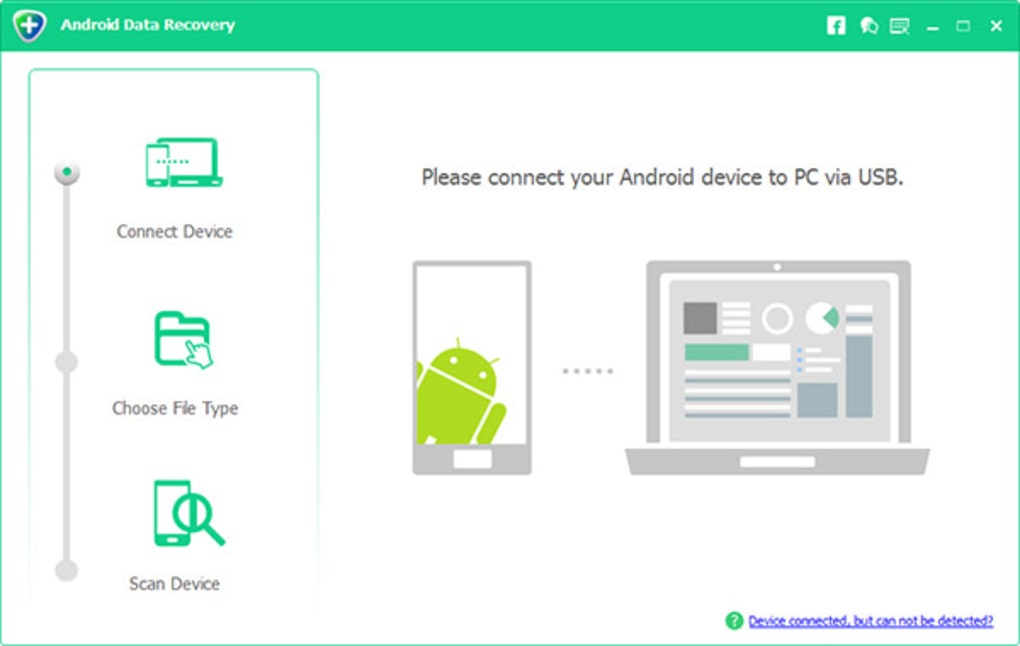
Getting started with Android Data Recovery is straightforward, even for users with minimal technical experience. First, download and install the software on your Windows or Mac computer from the official website. Ensure your Android device is charged and connected via USB. Enable USB debugging in your phone’s Developer Options (if not already enabled). This step is crucial for the software to access your device’s file system securely. Once connected, launch the app. The main screen will prompt you to select the type of data you want to recover—such as photos, videos, documents, contacts, SMS, or call logs. Choose your target category and click “Start Scan.” The software will begin scanning your device’s internal memory and SD card. This process may take a few minutes depending on the amount of data and device speed. During scanning, you’ll see a progress bar and real-time updates on detected files. After scanning completes, you’ll see a list of recoverable files. Use the filter options to sort by file type, date, or name. Preview files directly within the app to ensure they’re intact before recovery. Select the items you want to restore and click “Recover.” Choose a safe location on your computer to save the files—avoid the original device location to prevent overwriting. The recovery process is fast, and files are saved in their original format, preserving quality and metadata. For added safety, the software allows you to back up existing data before attempting recovery. This ensures you don’t lose current files while retrieving old ones. You can also export contacts in VCF, CSV, or HTML format for easy import into other apps. The entire process is secure, with no data transmitted to third parties. Regular updates ensure compatibility with new Android versions and improved recovery algorithms.Uyumluluk ve Sistem Gereksinimleri
Android Data Recovery is designed to work across multiple platforms, ensuring broad accessibility for users. It is compatible with Windows 7, 8, 10, and 11 (32-bit and 64-bit), as well as macOS 10.12 and later. This cross-platform support means users on both PC and Mac can utilize the software without limitations. The app supports a wide range of Android devices, including smartphones and tablets from major brands like Samsung, Google Pixel, Xiaomi, OnePlus, Huawei, and LG. For optimal performance, your Android device should be running Android 5.0 or higher. The software works on both rooted and non-rooted devices, though rooting is not required. A stable USB connection is recommended for the best results. The app requires a minimum of 2 GB RAM and 500 MB of free disk space on your computer. It’s lightweight and doesn’t consume excessive system resources during scanning or recovery. Support for SD card recovery is another key feature, allowing users to retrieve data from removable storage. Whether you’ve formatted your SD card or lost files due to accidental deletion, the software can detect and restore them. It also handles various file systems, including FAT32, exFAT, and NTFS. The software is regularly updated to maintain compatibility with new Android releases and to fix bugs. These updates ensure long-term usability and improved recovery success rates. With its broad compatibility and regular maintenance, Android Data Recovery remains a reliable choice for data recovery across devices.Android Data Recovery'ın Temel Özellikleri
- Silinen fotoğraf, video, müzik ve belgeleri kurtar
- Kişileri tam detaylarıyla (ad, numara, e-posta, görev) geri yükle
- SMS ve arama kayıtlarını zaman damgaları, süre ve arama tipiyle kurtar
- WhatsApp mesajlarını, medyayı ve ekleri uygulamayı kaldırmadan geri getir
- Birçok dosya formatını destekler: DOCX, XLSX, PDF, PPTX, HTML, ZIP
- Root gerektirmez – tüm Android cihazlar için güvenli
- USB hata ayıklama ve doğrudan bağlantı desteği
- Kişileri VCF, CSV veya HTML formatında dışa aktar
- Kurtarmadan önce dosyaları önizle
- Veri kaybını önlemek için mevcut verileri yedekle
Artılar ve Eksiler
- Artılar: Root gerektirmez, hızlı tarama, WhatsApp kurtarma desteği, kullanıcı dostu arayüz, çoklu format desteği, güvenli ve gizli
- Eksiler: Deneme sürümü kurtarmayı 50 dosyayla sınırlar, USB hata ayıklama kurulumu gerekir, yerel mobil uygulama yok (sadece masaüstü yazılımı)
Sıkça Sorulan Sorular (SSS)
-
Android Data Recovery, silinen WhatsApp mesajlarını kurtarabilir mi?
Evet, Android Data Recovery silinen WhatsApp mesajlarını, metin, medya ve belgeler dahil, uygulamayı kaldırdıktan sonra bile kurtarabilir. Kurtarma, verinin üzerine yeni dosyalar yazılmamış olmasına bağlıdır.
-
Bu yazılımı kullanmak için Android telefonumu rootlamam gerekiyor mu?
Hayır, rootlama gerekli değildir. Yazılım, USB hata ayıklama kullanarak rootlanmamış cihazlarda çalışır ve tüm kullanıcılar için güvenli ve erişilebilir bir çözüm sunar.
-
Kurtarma sürecinde verilerim güvende mi?
Evet, verileriniz güvende kalır. Yazılım dosyalarınızı herhangi bir sunucuya yüklemez. Tüm tarama ve kurtarma işlemleri bilgisayarınızda yerel olarak gerçekleşir.
-
Biçimlendirilmiş bir SD karttan veri kurtarabilir miyim?
Evet, Android Data Recovery biçimlendirilmiş bir SD karttan dosyaları kurtarabilir, veri üzerine yeni dosyalar yazılmadığı sürece.
-
Mobil uygulama sürümü mevcut mu?
Şu anda Android Data Recovery yalnızca Windows ve Mac için masaüstü uygulaması olarak mevcuttur. Yerel bir mobil uygulama bulunmamaktadır.







